Hard Links and Inodes Explained
Understanding why files are three separate layers, not one.
A file on a Unix system is three things wearing a trenchcoat, pretending to be one thing. It's three things wearing a trenchcoat, pretending to be one thing, and most of the confusion around hard links, symlinks, and that one "No space left on device" error nobody expects comes from forgetting that.
Unix filesystem files: three separate layers
Picture a file the way most people do: a name, an icon, some content. That mental model works fine right up until it doesn't, and the reason it breaks is that Unix never actually built files that way.
There are three separate layers, and they can come apart from each other, which is the whole point.
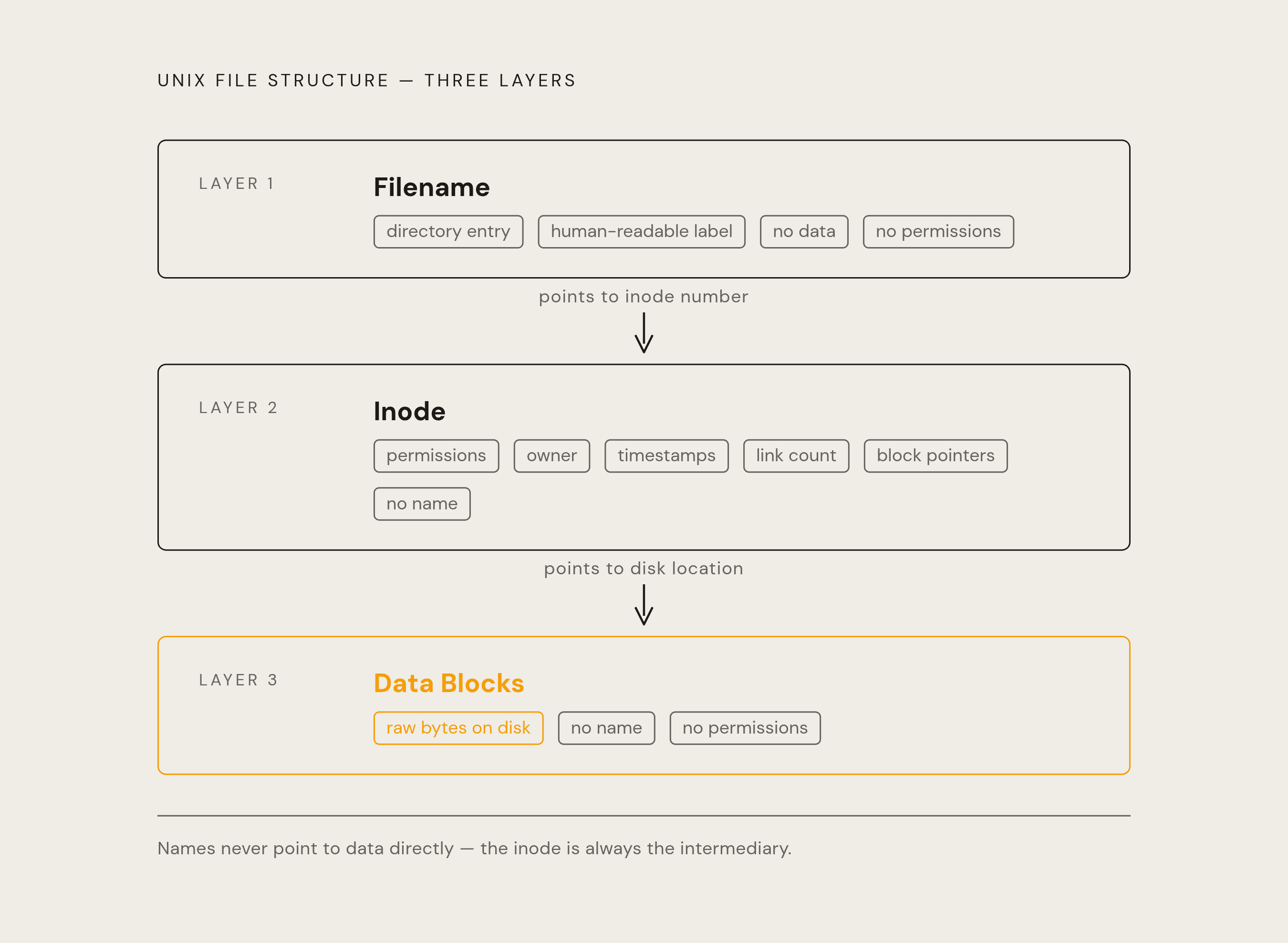
Layer one is the filename. That's just an entry sitting inside a directory, a human-readable label mapped to a number. The name itself holds no data and no permissions. It's a sticky note, not the file cabinet.
Layer two is the inode. This is the file's actual identity: all the metadata, all the pointers to where the bytes live on disk. Critically, the inode does not know its own name. It has no idea what it's called. It just knows what it is and where its data sits.
Layer three is the data blocks, the raw bytes on the disk platter or storage drive cell that the inode points to.
Names point to inodes. Inodes point to data. Names never point to data directly, and that one detail explains almost everything downstream.
How an inode works
An inode is basically a file's ID card, minus the photo and minus the name. It carries file type, permissions, owner and group IDs, size in bytes, three separate timestamps (access, modification, and inode-change), a link count, and a set of pointers to data blocks. Everything except what the file is called.
The link count determines when a file's data blocks get freed and whether deleting a name actually destroys the underlying data. It's a running tally of how many directory entries currently point at this particular inode, and that number is the mechanism behind hard links and deletion alike. Keep that number in your back pocket; the rest of this piece basically hangs off it.
Block pointers work in tiers because an inode has a fixed size and can't just balloon to fit huge files. A handful of direct pointers cover small files. Once a file outgrows those, indirect pointers kick in (a pointer that points to a block full of more pointers), and doubly-indirect pointers stretch that reach out into the gigabyte range. It's pointers pointing at pointers pointing at data, which sounds like a bureaucratic nightmare because, structurally, it kind of is.
Some filesystems skip all of that for tiny files, stuffing the actual data inline inside the inode itself. No block pointers, no dereferencing, just the content sitting right there in the metadata's living room.
How deletion works: unlinking, not erasing
Hit rm on a file and nothing gets erased. That's not a philosophical point, it's mechanical: rm calls unlink(2), which removes a directory entry and knocks the inode's link count down by one. That's the entire operation.
Data only actually gets freed when two things are both true at once: the link count hits zero, and no running process still has the file open. If either condition isn't met, the blocks stay put.
So a process can have a file open, someone else deletes it, the link count drops to zero, and the data just sits there, invisible to ls, invisible to the directory tree, fully intact on disk until that process finally closes its file handle. The file is dead to the filesystem but alive to whoever's still holding it open. Zombie file, basically.
That's also why deleting a huge file feels instant. Nothing is being wiped. A counter drops, an entry disappears, and the actual bytes don't move an inch until something else needs that space.

Hard links: what they share
A hard link is just another directory entry pointing at the same inode number. No new inode gets created, no data gets copied, nothing gets duplicated on disk.
Run ln file1 file2 and check ls -li afterward: both names show the same inode number, say 131082, and the link count reads 2. At the filesystem level, file1 and file2 are the same file, wearing two different name tags." They're the same file, wearing two different name tags.
Because everything that matters lives in the inode and its data blocks, not the directory entry, both names share identical permissions, identical owner and group, identical size, all three timestamps, and every byte of content. Changing the permissions on file2 changes file1 too, instantly, because there's no separate file1 to change. There's one inode, and two doors into the same room.
The two constraints that define where hard links cannot go
Two rules box in what a hard link can do, and both come from how inode numbers actually work.
First: filesystem boundaries. An inode number only means something within the filesystem that assigned it. Filesystem A's inode number and filesystem B's inode number carrying the same value are two completely unrelated things that happen to share a number, the way two different towns can both have a Main Street." A hard link has no field for specifying which filesystem it belongs to, so a cross-device hard link isn't just discouraged, it's structurally impossible. A symlink, by contrast, stores a path string rather than a number, and a string can point anywhere, including across filesystem boundaries, without issue.
Second: directories. Hard links to directories are blocked, outside a few narrow, kernel-level exceptions most people will never touch. Because a directory tree that links back into itself becomes a graph rather than a tree, tools like find that expect a tree will happily loop forever chasing their own tail. The kernel enforces both of these rules at the root level, literally, since even elevated privileges can't force a cross-filesystem hard link, and on most Linux distributions a directory hard link is rejected even with the -d flag thrown in.
Hard links versus symbolic links: a behavioral comparison on the dimensions that matter
Strip away the jargon and each type of link is defined by what it actually stores, and everything else follows from that one fact.
A hard link stores an inode number. It's welded to the file's identity, not its name. A symlink stores a path string instead. It's tied to a name, and names are far less permanent than identities.
That difference is most visible when something gets deleted. A hard link can't break as long as the inode still exists; deleting every other name pointing at that inode doesn't touch the one you're holding. A symlink has no such protection. Renaming, moving, or deleting the target turns the symlink into a "dangling symlink," pointing hopefully at a path that no longer resolves to anything. It's the digital equivalent of mailing a letter to an address that got bulldozed.
Cross-filesystem behavior splits the same way: impossible for hard links, fully supported for symlinks. And directories follow the same pattern again: hard links to them are effectively off-limits, while symlinks to directories are not just allowed, they're common (think of every /usr/lib -> /usr/lib64-style shortcut on a Linux box).
Inode exhaustion: the failure mode most teams don't know to monitor
Traditional Linux filesystems like ext4 build a fixed-size inode table at format time. That number gets locked in early, and once every inode in that table is spoken for, the filesystem refuses to create new files, even if there's a mountain of free block space sitting untouched.
The symptom throws people every time: "No space left on device," while df -h cheerfully reports gigabytes of headroom. The real story appears under df -i, which checks inode usage instead of block usage, and the shortage is visible there.
The trigger is almost always volume, not size. A workload that churns out enormous numbers of tiny files chews through inodes far faster than it chews through disk space, and training corpora built from individual images, audio clips, or text snippets are the textbook case. Millions of small files, each one costing exactly one inode regardless of how tiny it is, and the inode table runs dry long before the disk does.
Worse, the inode-to-block ratio gets fixed at format time. Once a filesystem is laid down with a given ratio, there's generally no clean way to expand it without a reformat, which is not a fun conversation to have mid-project.
Hard links and inode semantics in AI training pipelines
Global AI infrastructure spending more than doubled in 2025, hitting $318 billion, and it's on pace to cross $1 trillion by 2029. A meaningful chunk of that money is running headfirst into storage bottlenecks, not compute limits. More than half of organizations report that data and storage constraints are actively capping AI performance and scalability, and 70% of AI projects fail for reasons rooted in data infrastructure rather than bad model design.
This is where inode mechanics stop being trivia and start being operational reality. The parallel filesystems used in high-performance AI training tiers, Lustre, GPFS/Spectrum Scale, and BeeGFS among them, are all built on the inode model, and they're the systems where POSIX semantics, hard links included, actually get used in production rather than left as a footnote in a man page.
The practical payoff is zero-copy dataset versioning. Say a team is curating filtered, augmented, and stratified splits off one master training corpus. Instead of copying the unchanged files into each new version (an expensive, redundant use of disk and I/O), hard-linking those unchanged files across versions means every split points back at the exact same data blocks. No duplicated storage, no data movement, and version three of the dataset costs almost nothing extra to keep around as long as most of it overlaps with version two.
Object storage: a different architecture built for different tradeoffs
Object storage throws out the inode-and-directory tree entirely and organizes everything into a flat namespace, generally called a bucket. There's no inode table sitting in the background, no fixed inode ceiling, and consequently none of the inode exhaustion risk that haunts ext4 under a flood of small files.
That architecture makes object storage the natural home for data lakes, model checkpoints, and pre- and post-processing workloads that need to scale horizontally without limit and that talk to ML frameworks over HTTP or object-storage-style APIs rather than POSIX calls. Roughly 402 million terabytes of data get created every single day at this point, and a large share of that is unstructured, which is exactly the shape object storage was built to absorb. Most of the growth in global storage capacity is landing there precisely because it carries no hierarchical or inode-based ceiling to bump into.
The tradeoff doesn't disappear just because the scale story is good. Object storage has no native support for the POSIX operations, atomic directory renames, file locking, hierarchical namespace moves, that active training loops and agent-style workloads lean on constantly. Different architecture, different bill of goods: pick the one that matches what the workload actually needs done, not the one with the better spec sheet.