How Multipart Upload Works in S3
Breaking huge files into separately transmitted parts makes S3 uploads practical and reliable.

S3 caps a single PUT request at 5 GB. Anything bigger than that gets rejected by S3, with no exceptions. That's the whole reason multipart upload exists: it lets you break one object into separately transmitted parts, send them in, and have S3 stitch them back together on the other end.
The size ceiling above that single PUT has moved recently, and moved a lot. As of December 2025, the maximum S3 object size jumped from 5 TB to 50 TB. That change is recent enough that plenty of documentation floating around still quotes the old 5 TB figure, so don't be surprised if you see conflicting numbers depending on what you're reading. Practically, it means multipart upload is now required for a much wider range of objects, including the kind of large AI training datasets that used to bump against the old ceiling.
AWS doesn't wait until you hit the hard 5 GB wall to recommend multipart upload. The documentation suggests using it for anything 100 MB or larger, well under that ceiling. Think of the 5 GB limit as the wall you cannot walk through, and the 100 MB mark as the point where walking around starts being smarter than walking straight at it.
The mechanics have their own limits to know before you build anything on top of them. Parts are numbered 1 through 10,000, so that's your part budget per object. Every part except the last one must be at least 5 MB, and no part can exceed 5 GB. Those three numbers (10,000 parts, 5 MB minimum, 5 GB maximum per part) define the whole design space you're working inside.
The three-phase protocol: initiate, upload parts, complete
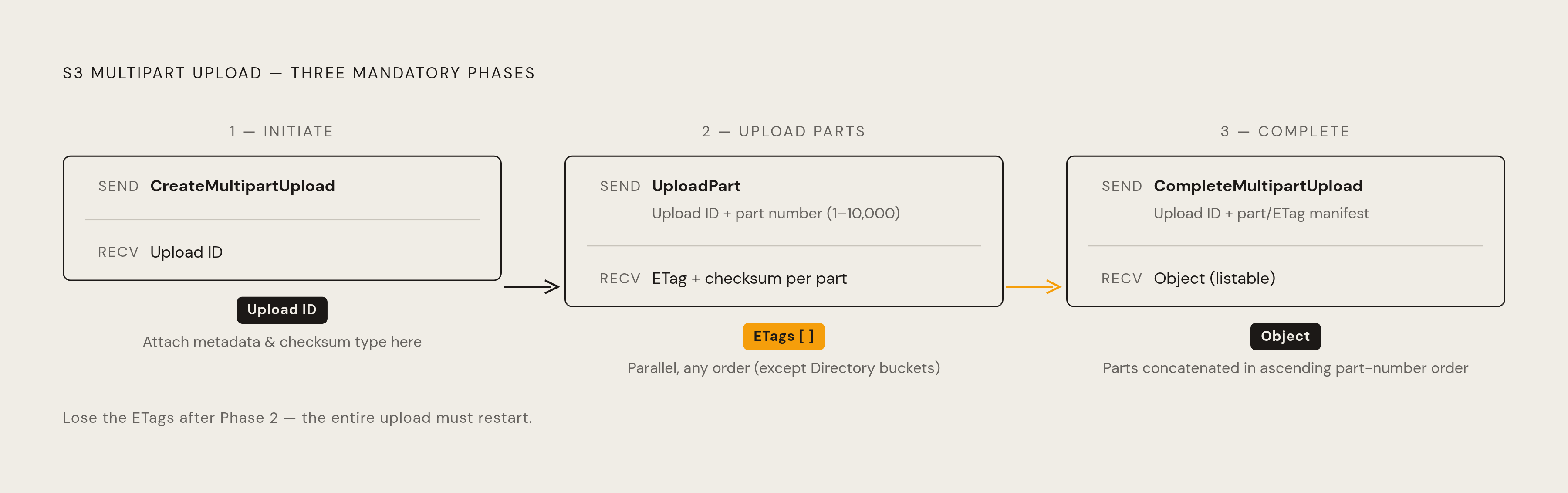
Multipart upload runs in three phases, in a fixed order: initiate, upload parts, complete. Skipping one or running them out of sequence breaks the whole upload, so it helps to picture it as a conversation between client and S3 with three distinct exchanges.
Phase one is initiation. The client sends a CreateMultipartUpload request, and S3 hands back an upload ID. Treat that ID like a claim ticket: every later operation (uploading a part, listing parts, completing the upload, or aborting it) needs it. Initiation is also the only point where object metadata gets attached. There's no adding it later, so decide it up front. The checksum type for the upload gets specified here too, locking in how integrity gets verified down the line.
Phase two is where the actual data moves. Each UploadPart call needs the upload ID plus a part number between 1 and 10,000. In general purpose buckets, those part numbers don't need to run consecutively. You could upload part 7 before part 3, and S3 won't blink. Directory buckets, the S3 Express One Zone flavor, work differently: part numbers there must be consecutive, so if you're switching between bucket types, reusing upload logic across them will break. For every part sent, S3 returns a checksum value and an ETag, and the client needs to hold onto every part number and ETag pair. Those values become required inputs for phase three, so losing track of them mid-upload means starting over. If a part fails in transit, only that part needs resending; the rest of the parts already sitting in S3 stay put, untouched. Parts can go up in parallel and in any order, and that parallelism is the main performance lever the whole protocol hands you.
Phase three is completion. CompleteMultipartUpload takes the upload ID and the full list of part numbers and ETags collected in phase two, and S3 assembles the final object by concatenating the parts in ascending part-number order. Any metadata set during initiation gets attached to the finished object at this point. Only once completion succeeds does the object exist as a normal, listable S3 object.
Picture it as three short exchanges: client asks for an upload ID and gets one back, client sends parts and gets a checksum and ETag back for each, client sends the full manifest and gets a finished object back. Nothing about this sequence is optional and nothing about it can be shortened.
Checksum and integrity behavior across the three phases
Multipart upload handles data integrity differently than a single PUT, and that difference trips people up constantly when they try to sanity-check an upload after the fact.
Current AWS CLI versions calculate a CRC checksum for the upload and send it along with the data. What happens with that checksum depends on the upload type. For composite uploads, S3 validates each part's checksum individually as it arrives. For full-object uploads, S3 holds off and validates the entire object at the moment CompleteMultipartUpload runs, rejecting the completion if the checksum doesn't match. If an object gets uploaded without an explicit checksum specified, S3 adds a CRC64NVME checksum by default, part of AWS's standard data integrity protections.
The detail that causes the most confusion is the ETag. For a multipart upload, the completed object's ETag is built from each individual part's MD5 rather than the MD5 hash of the whole file, and the result ends in a suffix like -N, where N is the number of parts that made up the upload. A mismatch between a quick local MD5 check and that ETag reflects two different math problems that were never going to produce the same answer, not file corruption. The ETag format is a structural consequence of how multipart assembly works, not a warning sign.
The correct way to verify integrity is to pull the stored checksum directly, using something like head-object with checksum-mode set to ENABLED, rather than trying to recompute an MD5 locally and compare it to the ETag. At the part level, each uploaded part carries its own individual ETag while the upload is in progress. Once CompleteMultipartUpload runs and all the parts get consolidated, every part folds into the single ETag of the finished object.
Use the checksum endpoint, not an MD5-versus-ETag comparison, when you need to confirm an upload is intact.
Failure modes in multipart upload
Multipart upload's resilience is also where its one real cost trap lives, and both come from the same design choice.
Start with what survives. If a single part fails mid-transmission, only that part needs to go again. Every other part already sitting in S3 stays exactly where it is, fully intact, with no need to resend anything that already succeeded. That's the headline benefit of the whole protocol: a flaky connection costs you a few megabytes of retry, not a multi-gigabyte restart.
The flip side is quieter and easier to miss. There is no automatic expiry on an in-progress multipart upload. Once you call CreateMultipartUpload, those parts sit in S3 indefinitely unless something explicitly completes or aborts the upload. A dropped connection, a crashed client, a forgotten script, any of these can leave a multipart upload hanging open with parts fully stored and fully billed, and nothing about a standard S3 listing will show you it's there. Uploaded parts don't show up as objects in your bucket until the upload completes, so you can be paying for storage you can't even see in a normal directory listing.
There's a timing wrinkle on the cleanup side too. If an abort gets issued while parts are still in flight, those in-flight parts can still succeed or fail after the abort call goes out. To guarantee every byte of storage actually gets freed, the safe sequence is to wait until all part uploads have finished one way or another before issuing the abort.
Finding these orphaned uploads takes a specific command, since they're invisible to normal tools: aws s3api list-multipart-uploads --bucket <bucket> surfaces exactly the in-progress uploads that standard listings hide. Running it on a bucket that's been handling large files for a while can turn up more ghosts than expected.
The retry-only-the-failed-part benefit and the orphaned-parts billing risk come from the exact same architectural decision: S3 keeps parts around individually and doesn't force a decision on them. That flexibility is what makes the protocol resilient, and it's also what makes cleanup a separate problem you have to solve on purpose.
Cleaning up incomplete uploads: lifecycle rules and manual abort
Two tools handle orphaned uploads: one for ongoing hygiene, one for immediate action.
The long-term fix is a lifecycle rule. S3 supports an AbortIncompleteMultipartUpload rule that automatically aborts uploads left incomplete past a set number of days, and deletes the associated parts along with them. It applies to incomplete uploads that already exist in the bucket as well as any future ones, so setting it once both protects against new orphans and cleans up the ones already sitting there.
The rule's JSON structure centers on one field: DaysAfterInitiation. A value of 7 is a common starting point, but the right number depends entirely on how long legitimate large uploads actually take in a given workload. If a dataset upload routinely runs for five days under normal conditions, a 7-day window leaves barely any margin. Set the threshold based on how your actual uploads behave, not on a number someone else picked for a different workload.
For anything that needs handling right now rather than on a schedule, manual abort does the job. Running aws s3api abort-multipart-upload with the bucket name, the object key, and the upload ID stops that specific upload immediately. Once an abort goes through, that upload ID is dead. No further parts can be uploaded against it, and the only path forward is starting a fresh multipart upload from scratch.
This isn't a cost-optimization nice-to-have. An upload with no expiry and no cleanup mechanism will accumulate storage charges indefinitely, invisible to anyone not specifically checking for it. Getting a lifecycle rule in place is closer to a correctness requirement than a budgeting exercise.
Tuning throughput: parallelism, part size, and the CRT client
The AWS CLI ships with conservative multipart defaults, and knowing what those defaults are, is the first step in deciding whether to change them.
By default, the CLI automatically switches to multipart upload for any file above 8 MB, splits the file into 8 MB chunks, and uploads multiple parts concurrently without any extra configuration. That's a reasonable default for a general-purpose tool, but it has a ceiling. With 8 MB parts and the 10,000-part cap, the default configuration tops out around 80 GB before the CLI starts automatically bumping up part size to compensate. If you're regularly moving objects near or beyond that range, the defaults are already working harder than you might assume.
Two settings, both adjustable with aws configure set, give you direct control over throughput. The first is max_concurrent_requests, which controls how many parts upload at once. Pushing that number up on a fast, stable connection moves data noticeably quicker. On a slow or congested connection, pushing it up makes concurrent parts fight each other for the same limited bandwidth, which hurts more than it helps. The second lever is preferred_transfer_client, set to crt, which switches to an alternative, more performant transfer client. The CRT client can meaningfully improve transfer throughput, and setting it explicitly (rather than leaving the CLI to decide automatically) guarantees it gets used regardless of what kind of host you're running on or what other conditions apply.
Settings only go so far, though. Network topology does more to determine upload speed than any configuration flag. Running an upload from an EC2 instance in the same AWS region as the destination bucket routes the transfer over internal AWS network bandwidth, which can be substantially faster than the uplink from a typical office or data center. How much faster depends on the EC2 instance's network tier and how many parallel connections are running at once, so it's not a fixed multiplier. Still, the general pattern holds: picking the right place to run the upload from matters as much as any tuning you do once it starts moving.
Sources
- Uploading and copying objects using multipart upload in Amazon S3 - Amazon Simple Storage Service
- Using multipart uploads with directory buckets - Amazon Simple Storage Service
- Checking object integrity in Amazon S3 - Amazon Simple Storage Service
- Configuring a bucket lifecycle configuration to delete incomplete multipart uploads - Amazon Simple Storage Service
- Amazon S3 multipart upload limits - Amazon Simple Storage Service
- Discovering and Deleting Incomplete Multipart Uploads to Lower Amazon S3 Costs
- Introducing CRT-based S3 Client and the S3 Transfer Manager in the AWS SDK for Java 2.x
- Checking object integrity for data uploads in Amazon S3 - Amazon Simple Storage Service