Sparse Files and Hole Punching in Linux
Hole punching recovers wasted disk space in Linux files through deliberate deallocation.
Sparse files exploit a fundamental split between a file's apparent size and its allocated size, and hole punching via fallocate() is the deliberate, after-the-fact tool for collapsing allocated blocks back into that gap (understanding both the passive and active mechanisms gives practitioners precise control over storage efficiency and I/O behavior on Linux).
The two sizes every Linux file carries
Every regular file on Linux is lying to you a little. It does this through its inode, which keeps two completely separate numbers for size. One is st_size, the apparent size, the number ls -l puts on screen. The other is st_blocks, the allocated size, the one du actually checks when it counts real disk usage. For an ordinary file those two numbers track each other pretty closely, size climbing as data goes in, nothing weird happening. A sparse file breaks that agreement on purpose: some stretch of the file's logical length has no disk blocks sitting behind it at all.
Those gaps are called holes, and calling them "empty space" undersells what's going on. A hole is a promise made at the filesystem level: read from this range and you get zeros back, no disk ever gets asked to spin up and do anything. It's the kernel handing you zeros for free, without a single byte of actual storage involved.
The party trick that proves it. Open a brand-new file, seek out to the 4 GiB mark, write one lonely byte, then close it. Ask ls how big the file is: it'll swear up and down that it's 4 gigabytes. Asking du, though, changes the story completely: the file is next to nothing on disk. That gap between the two answers is the whole mechanism working exactly as designed. It's the whole mechanism working exactly as designed.
How Holes Enter a File: Omission at Write Time vs. Punching After the Fact
Holes get created two different ways, and mixing them up is where people waste disk space without ever noticing; every regular file on Linux has two independent size numbers in its inode: st_size (apparent size, what ls -l prints) and st_blocks (allocated size, what du reports). The first way is passive: a program seeks past a range of bytes and starts writing further along, and the filesystem never bothers allocating blocks for whatever got skipped. Nobody requests the hole. It occurs because nothing ever claimed that space to begin with.
Whether a piece of software does this depends entirely on how it writes data, and quiet, expensive mistakes occur exactly there. A tool that streams every byte in sequence, start to finish, allocates blocks for the whole file, zeros and all, no matter what its intent was. A tool built to write only the pages that actually changed leaves the rest as holes automatically, no flag required. Don't take a tool's documentation at its word here. Checking du against ls lets the numbers argue it out.
The second way is active: punching. This works on a file that's already fully allocated, dense, no holes anywhere, and it goes in after the fact to hand blocks back to the filesystem's free pool. The apparent size doesn't budge when this happens. The file still claims to be whatever length it always was. It's just lighter now, backstage, like a hotel room that still has your name on the door long after housekeeping cleared everything out.
Treat these as two different tools for two different jobs, not competing ways of doing the same thing. Omission is the cheap path, the one you want happening automatically the first time data gets written. Punching is triage: something you reach for after a file got written densely in the first place, or after some careless tool fattened up a once-sparse file along the way. One is prevention. The other is cleanup, and cleanup always costs more.
What fallocate() with FALLOC_FL_PUNCH_HOLE does at the kernel level
Hole punching wasn't always a standard, portable feature. XFS and OCFS2 had it first, each built independently, before anyone bothered unifying the interface.
What the flag actually does, mechanically, is narrower than most people assume. It deallocates space across a byte range defined by an offset and a length. Inside that range, anything landing on a partial filesystem block gets zeroed out in place, while anything lined up with whole filesystem blocks gets removed from the file entirely, freeing the underlying space. It isn't one uniform action across the range: partial blocks get zeroed, full blocks get reclaimed, and those are genuinely different outcomes happening side by side.
There's a flag requirement that trips people up constantly. FALLOC_FL_PUNCH_HOLE has to be ORed together with FALLOC_FL_KEEP_SIZE, and the kernel enforces this without exception. Even if the punched range runs past what looks like the useful end of the file, whatever stat reports for size never changes. The file's apparent length stays sacred. Punching touches allocation. It never touches length, full stop.
A filesystem may also require that both offset and length land on multiples of its logical block size, typically 4096 bytes, so a punch that isn't aligned to that boundary, or is smaller than one block, fails outright with EINVAL. Here's the real gotcha: some scanners punch holes across arbitrary byte ranges without checking alignment first, and the call returns success anyway, because it didn't technically error. Nothing actually gets freed, since the range never lined up with anything the filesystem was willing to act on. A tidy exit code with zero effect: that's the failure mode to watch for.
The fallocate -d (dig-holes) command for re-sparsifying existing files
For the common case of "this file used to be sparse and now it isn't," there's a command built for exactly that cleanup: fallocate --dig-holes. It scans a file in place, finds the holes it should have, and punches them, no extra scratch space required to pull it off. --keep-size behavior is baked in automatically, so there's nothing extra to remember to pass.
The scenario this fixes occurs more than you'd think. A backup utility, or a naive copy job, inflates a file that used to be nicely sparse into something fully dense. Run fallocate -d against it: it hunts for runs of zeros, deallocates the blocks sitting behind them, and brings the file back down close to its original footprint.
The filesystem's I/O block size, usually 4096 bytes, sets the floor on how small a hole this process can create, and that same number keeps reappearing throughout this whole territory https://man7.org/linux/man-pages/man1/fallocate.1.html. A pocket of zeros smaller than one full block doesn't qualify. It stays as real, allocated zeros on disk whether anyone likes it or not.
The alignment trap from the previous section comes back to bite people in their own tooling here, too. Whether it's fallocate -d under the hood or a custom scanner someone wrote in an afternoon, the scanning and punching has to happen in units aligned to the filesystem's actual block size. Read that value directly, off stat's IO Block field or statvfs's f_bsize, and don't hardcode 4096 and hope. Get this wrong and the failure hides well: the scanner reports gigabytes of holes punched, logs a tidy success message, and frees absolutely nothing. It's the storage equivalent of paying off a debt with counterfeit bills. A transaction happened, technically. Functionally, nothing moved.
Filesystem support matrix and behavioral differences practitioners need to know
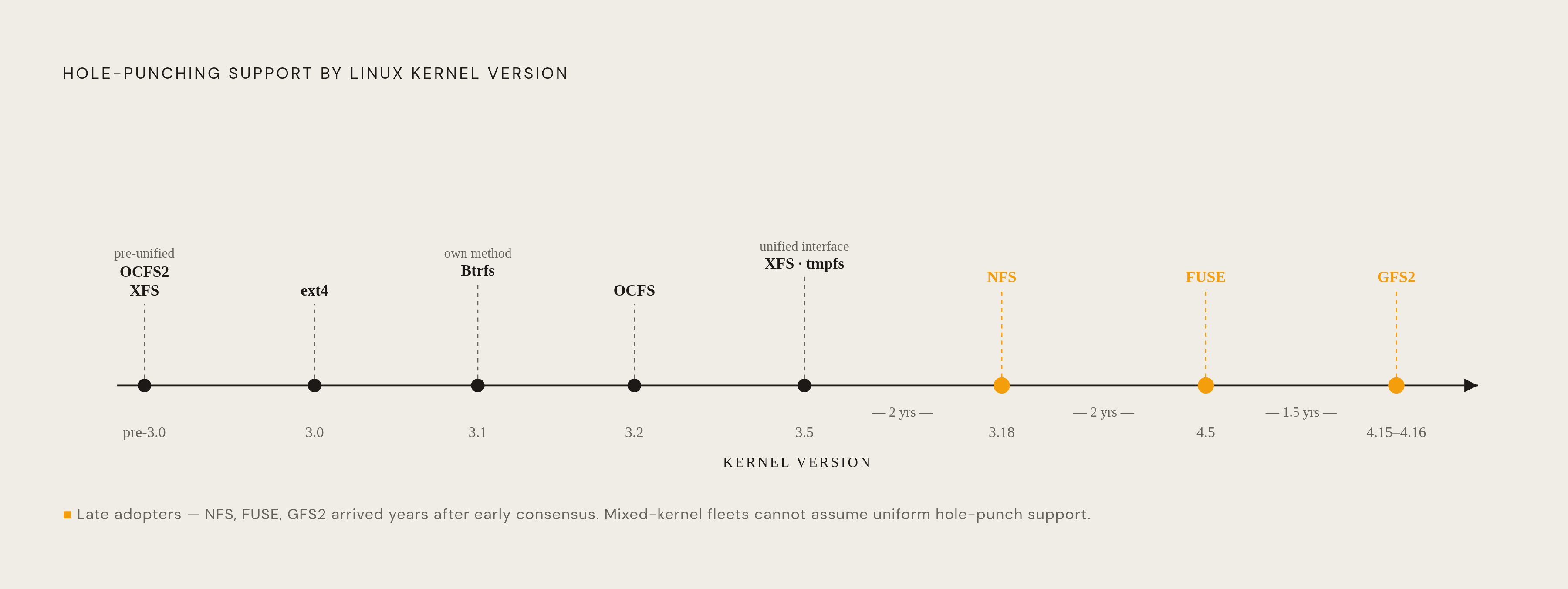
Support for punching holes didn't land on every filesystem at once, and treating them as interchangeable is a mistake that catches people running older kernels off guard.
ext4 has supported hole punching since Linux 3.0. Btrfs got there first at Linux 3.1, OCFS at 3.2, XFS at 3.5, and ext4 alongside tmpfs caught up at 3.8 https://man7.org/linux/man-pages/man1/fallocate.1.html. NFS didn't pick it up until Linux 3.18, FUSE waited until 4.5, and GFS2 brought up the rear again at 4.15 https://man7.org/linux/man-pages/man1/fallocate.1.html. If there's any doubt about which kernel is running underneath a given system, check the version. Don't guess.
Btrfs deserves its own callout, because it doesn't do sparseness the way ext4 or XFS does, and assuming otherwise is a real trap. It represents sparse regions through extents carrying an EXTENT_FLAG_PREALLOC flag. The practical consequence: an operation that leaves a clean hole on ext4 might instead preallocate blocks on Btrfs, which looks similar from a distance but behaves completely differently on disk. Don't assume behavior transfers cleanly between filesystems. Run filefrag -v and look at the actual extent layout instead of trusting your instincts.
There's also an extent-merging quirk shared across ext4, XFS, and Btrfs, subtle enough to cause real confusion when it bites https://www.spinics.net/lists/linux-btrfs/msg67942.html. When two extents sit close together with only a small gap between them, the filesystem may merge them into one, filling that gap with actual zeros just to keep the extent list shorter. That decision quietly increases disk usage, since a hole just became real allocated space. Worse, the extent list changing mid-read causes SEEK_HOLE and SEEK_DATA to hand back answers that don't match reality, claiming data where there's now a gap, or a gap where there's now data. Anything precision-critical leaning on these calls should treat their answers as a snapshot in time, not gospel. Btrfs has supported this functionality since Linux 3.7. tmpfs has supported it since Linux 3.5. GFS2 caught up at Linux 4.16.
Navigating sparse files programmatically with SEEK_HOLE and SEEK_DATA
This matters most for backup and archiving software. tar, cpio, and rsync can all notice long runs of zeros and skip over them, but scanning byte by byte to find those zero runs is slow and wasteful, especially at scale. Asking the kernel directly, through SEEK_HOLE and SEEK_DATA, for the segment map is far faster, since the filesystem already knows the answer and doesn't need to re-derive it by reading actual bytes.
None of this happens on its own, and people miss this constantly. tar -S, rsync -S, cp --sparse=always, and dd conv=sparse are the actual flags that tell each tool to respect sparseness, either preserving it on copy or reconstructing it on write. If the flag is skipped, the tool defaults to treating the file as one continuous stream of bytes, holes included. That default is the single most common way sparse files get quietly and permanently flattened.
There's movement happening even lower in the stack, too. An RFC patch series from March 2024 proposed extending SEEK_HOLE and SEEK_DATA support down to block devices themselves, not just the filesystems sitting on top of them. The goal is letting copy and backup software skip over ranges with no actual data at the device level, one layer below where this capability currently lives. More than a decade after SEEK_HOLE first landed in mainline filesystems, people are still finding performance sitting on the table.
The five boundaries where sparseness quietly dies
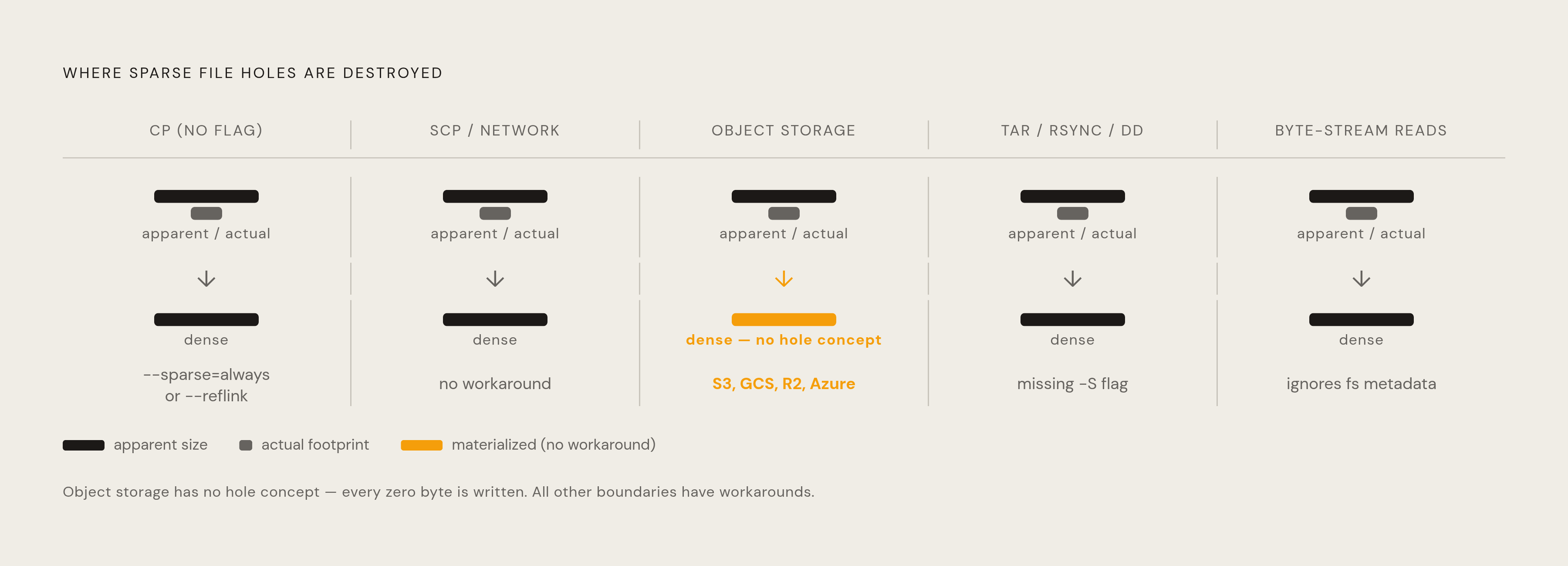
Sparseness lives entirely in filesystem metadata. Any tool, protocol, or transport that reads bytes and writes bytes without consulting that metadata ends up materializing the file's full apparent size, holes and all. The context gets left behind the second something stops asking the filesystem what it knows.
The plainest boundary is also the most common one. Running cp without --sparse=always or --reflink reads every byte of the source and writes every byte to the destination, allocating real disk blocks for every single zero along the way. Take the earlier example: open a file, seek to 4 GiB, write one byte, close it, and the result is a 4 GiB apparent file occupying essentially nothing on disk. Copy it the wrong way, and that trick vanishes completely. Nothing failed, technically. The copy just never knew it was allowed to skip anything.
Network transfers hit the same wall, arguably worse. scp and most network transfer tools operate purely on byte streams, with no concept of holes baked into the protocol anywhere. Sparseness gets lost somewhere in transit, and whatever lands on the far end is fully allocated, dense, no gaps left. The sender might have held a tidy, sparse file. The receiver never gets the memo.
Object storage is the third boundary, and it's the least forgiving of the bunch, because the concept doesn't exist there. S3, GCS, R2, and Azure Blob have no notion of a filesystem hole. Write a sparse file into one of these systems and it comes out the other side fully materialized, every zero present and accounted for. A workaround ecosystem has grown up around this (sidecar chunk-index headers, logic that only fetches non-zero chunks on demand), but every piece of it has to be built and wired in on purpose. None of it comes free.
That mismatch is why the sparse-file conversation and the object-storage conversation keep colliding. Cheap, slow storage that can't represent a hole at all is a strange pairing with a technique whose entire point is skipping wasted space. Anyone building around both should stop expecting object storage to inherit sparseness for free, because it won't, and no amount of clever configuration changes that math.
Sparse files and hole punching in AI training and snapshot infrastructure
AI training checkpoints are a genuinely useful lens for why any of this matters outside of disk-space trivia. During training, model weights get written out to storage at set intervals, insurance against the run dying partway through. Checkpoint size has nothing to do with how many machines are doing the training, which throws people the first time they hear it. A 405-billion-parameter model trained across thousands of nodes produces exactly the same checkpoint as the identical model trained on three nodes. Only one copy of the weights needs saving, and even for the largest LLMs that's still under a hundred terabytes. The job might be enormous. What actually gets saved isn't.
Sparse files appear here whenever weight tensors get written incrementally or differentially instead of in one dense pass, which can leave real holes sitting in the resulting checkpoint files. A high-performance filesystem layer sitting between object storage and the GPUs doing the training can cache and serve those files considerably faster than writing straight to object storage and eating that latency every single time.
MLPerf Storage v3.0 is the current benchmark tracking exactly this kind of workload, with scope now covering training, checkpointing, KV cache, and vector database tests. The newer S3 object storage access layer is supported for training, checkpointing, and some vector database tests, and roughly one-sixth of all submissions in this round actually used it https://www.blocksandfiles.com/ai-ml/2026/09/01/mlperf-storage-benchmark-updated-for-modern-ai/5293617. That's a real signal that S3-backed storage paths are getting benchmarked seriously now, instead of treated as the fallback everyone quietly avoids.
The top result in that round came from Everpure's FlashBlade//EXA, which placed first across both the 405B-parameter and 1.25T-parameter model categories for checkpointing and KV cache. On the 1.25T-parameter model specifically, it hit 877.52 GiB/s write bandwidth and 588.28 GiB/s read bandwidth, using 30 data nodes to simulate 1,024 accelerators https://www.blocksandfiles.com/ai-ml/2026/09/01/mlperf-storage-benchmark-updated-for-modern-ai/5293617. That's the number the rest of the field gets measured against now, and it's a tall bar. Sparse files and hole punching don't erase that trade-off. They just decide how much of it you're forced to pay for. Object storage (S3, B2, R2) is 5–10× cheaper per TB than block storage (EBS, Persistent Disks) https://mixpeek.com/curated-lists/best-s3-object-storage-for-ai. Object storage has a typical latency range of 50–100ms https://mixpeek.com/curated-lists/best-s3-object-storage-for-ai. Block storage (EBS, Persistent Disks) has a typical latency range of 1–5ms https://mixpeek.com/curated-lists/best-s3-object-storage-for-ai.